



Mr. Duck
-
Posts
1,121 -
Joined
-
Last visited
-
Days Won
4







Mr. Duck's Achievements






-
 🎮 Controller Usage FAQ — How to Use Controllers With Our Products Using a controller with most of our cheats is not natively supported. Only a very small number of internal products allow direct controller input. However — you CAN use a controller on ANY DMA product with the correct setup. Here’s everything you need to know: ❓ Can I use a controller on your products? Yes, but only with DMA hardware + a XIM device. Most internal cheats do not support controller input on their own. To use a controller, you must route your inputs through DMA → XIM → Makcu → PC. 🎮 How does the XIM allow controller support? The XIM acts as a translator. It converts your controller inputs into mouse/keyboard signals that DMA products understand. Basic flow: Controller → XIM → Makcu → DMA → Game This ensures: Your controller inputs register correctly with ALL DMA cheats Aimbot, ESP, tracking, and QoL features stay fully functional No need for input bridging software or extra scripts 🧩 What do I need? To use a controller on ANY DMA product, you need: DMA hardware (Makcu, 35t, 75t, 100t, Fuser, etc.) A XIM device (XIM Apex / XIM Matrix / XIM NEXUS, etc.) Your normal controller (Xbox, PS4/PS5 depending on XIM compatibility) ⚙️ How do I connect everything? Plug your controller into your XIM. Connect the XIM to your Makcu or DMA card. Launch your DMA loader/firmware. Load into the game. Play using your controller — all DMA functions will work normally. 📝 Tips for best performance Use polling-rate matched settings Most XIM devices work best at 250–1000 Hz depending on the controller. Match this with your DMA firmware polling if adjustable. Disable controller dead zones in-game if possible XIM handles aim translation better with lower dead zones. Make sure your XIM is updated Older firmwares sometimes fail to handshake properly with DMA setups. Use a wired controller for the most stable connection. Expect slightly different aim smoothing Because the XIM translates to mouse input, aim assist may behave differently in some titles. 🕹️ Do all consoles/controllers work? Supported depends on your XIM model: XIM Apex → PS4/Xbox controllers XIM Matrix → PS5/Xbox/Switch XIM NEXUS → Wireless gyro support + Xbox/PS support (via adapter) But once the XIM sees the controller, DMA compatibility is universal. 📌 Summary Most internal cheats do NOT support controllers directly. Using a controller requires DMA hardware + XIM. After connecting your controller → XIM → DMA card, all features work normally. Works on ANY DMA-supported game titles.
 -
Q: What happens if my firmware is blocked? A: If your firmware is blocked, it will no longer function in-game. You may experience crashes, features not working, or the firmware failing to load altogether. This is a normal part of staying ahead of anti-cheat updates. Q: How can I prevent my firmware from being blocked? A: Unfortunately, there is no way to fully prevent blocks. Anti-cheats regularly update their detection methods, and even the best firmware can be flagged. The only way to stay safe is by updating to the latest firmware when provided. Always: Use the most recent firmware delivered to you. Follow all setup instructions exactly (BIOS, Windows settings, etc.). Avoid sharing firmware outside of your account, which increases the risk of leaks and detection. Q: How often do firmware blocks happen? A: The frequency can vary. Generally firmwares last months without issues, other times they may be detected in shorter periods. This depends on anti-cheat activity, game updates, and whether a detection wave is occurring. Our developers constantly monitors blocks and prepares new firmwares to keep downtime as minimal as possible. Q: What does it mean when a firmware is blocked? A: A blocked firmware simply means that the device ID or method it used has been flagged by the anti-cheat. It does not mean your hardware is permanently unusable. Once a block occurs, we rebuild and deliver a new firmware on a different device ID or method, restoring functionality. Q: What about warranty and replacements? A: You can see the exact warranty length for each firmware in its product description. Every firmware we sell comes with at least a 1-month warranty, meaning you’ll receive free replacements during that period if blocked. After your warranty expires, you can still get replacements at a 50% discount.
-
Greater Flexibility for You By not pre-flashing the firmware, you have full control over how and where you use it. You're free to flash the firmware on your current card or reuse it later on any compatible future cards—no restrictions. Full Firmware Access When we don’t pre-flash, you retain full access to the original firmware file. This means you can reflash, back up, or switch configurations anytime without relying on us for resets or locked setups. No Hardware Restrictions Our approach ensures your firmware isn’t tied to one specific device. This gives you more freedom to upgrade or swap hardware without complications. Custom Setup Options Different users have different needs. Leaving flashing in your hands allows you to choose custom firmware, modify settings, or adapt configurations for your specific build.
-
Your timer begins the moment you inject the cheat through the loader—not when you purchase.
-
Most of our products automatically update for small patches. However, for major game updates, the cheat may require an update. Any necessary updates will be posted in our Discord server's Updates channel accordingly. Any lost time due to updates will be compensated.
-
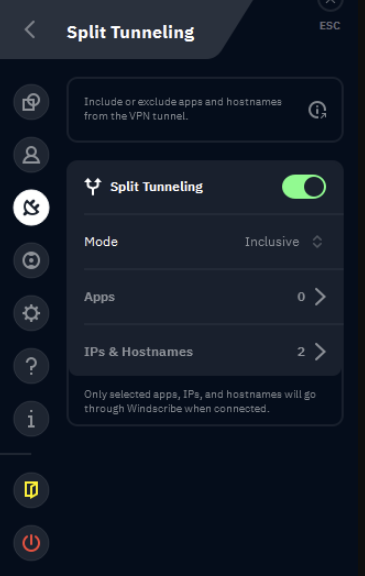
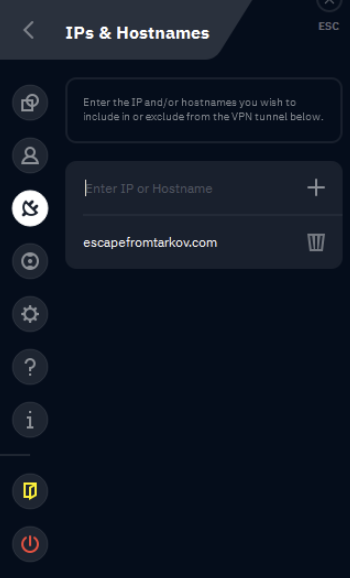
Choose the Right VPN Use a VPN that supports Split Tunneling by IP or URL such as Windscribe, most others do not work. Enable Split Tunneling Open Settings in your VPN. Navigate to Advanced Settings. Locate and enable Split Tunneling. Add Required Website Add escapefromtarkov.com to the Split Tunneling list. Connect to Russia (Moscow) Select Russia -> Moscow as your VPN location. Ensure Split Tunneling is enabled and active. Open Your Game You are now good to open your game, the VPN must remain on.

-
The Artix-7 75T performs slightly better for DMA (Direct Memory Access) cheats compared to the 35T because it has more resources and better optimization capabilities for handling memory operations. Here's why: More Resources for Data Handling: The 75T has more logic cells and block RAM, which means it can handle slightly more complex memory operations without slowing down. This helps it read and write memory a bit faster. Improved Parallel Processing: The extra resources allow the 75T to process multiple memory-related tasks in parallel more efficiently. This reduces the time spent waiting for data to move or update. Better Performance in High-Speed Transfers: If you're using DMA to quickly move data between memory and peripherals (or another PC), the 75T's higher capabilities mean less overhead and smoother data flow. This translates to a 10-15% speed improvement in reading or writing memory. In simple terms, the 75T is better at multitasking and managing data, so it can slightly speed up memory-related operations. While the difference isn’t huge, it’s noticeable when precision and speed are critical, like in DMA cheats.
-
A rare issue affects some B550 motherboards, primarily ASUS models, where a security driver flags DMA devices regardless of firmware. This can lead to bans in Easy Anti-Cheat (EAC)-protected games. While most reports involve ASUS boards, a few cases have been noted with other brands, though these are extremely rare. Other chipsets, like B450 and B650, are completely free of this issue. The problem persists regardless of DMA firmware type, whether Basic (CFW), Premium (Valorant CFW), or Ultimate (Emulated FW). For a worry-free setup, any other motherboard would be your safest option. If using a B550, especially ASUS, test thoroughly in low-risk scenarios. For most users, this issue is unlikely to occur.
-
EFT Clutch.rar
-
Marvel Direct.cfg
-
Fortnite-Direct.cfg
-
-
A Hardware ID Spoofer (HWID Spoofer) is a tool designed to alter your PC's unique hardware identifiers, effectively "spoofing" them. It's highly recommended to use a spoofer when cheating, as it protects your original HWID serials from being banned by anti-cheat systems. If you’ve already been HWID banned, a spoofer is essential to bypass the ban and regain access to your game or service.
-
Mr. Duck changed their profile photo
-
KM Box (Net / B+ / B Pro) vs Makcu – Guide KM Box was the original go-to for spoofing mouse and keyboard input, but it’s fallen behind in reliability and detection safety—especially when compared to newer solutions like Makcu. KM Box (Net / B+ / B Pro) What is it? A hardware aim assist device originally used for spoofing mouse and keyboard inputs. The Net model is the newer version, while B+ is the older, Python-supported dual-core units. Pros – Net: Compact with four USB ports. Hardware encoder built-in. Can monitor real keyboard/mouse and mimic inputs. USB timing/parameter tweaks possible. Pros – B+/B Pro: Python scripting support. Acceptable input spoofing and control. Cons: Easier detected in major games like Fortnite, Valorant, and Faceit. (Compared to Makcu) Bad "spoofing" (device emulation isn’t 1:1) causes mismatched descriptors and suspicious timing. No USB passthrough—emulation only, with sloppy results and locked to 1kHz. Higher price with hardware locking. Community has largely abandoned it—ban reports are increasing. Not open-source, and software is outdated. Use Case: Only viable if you’re stuck with an old setup and not touching any competitive anti-cheat-heavy titles. Good for legacy setups only. Anti-Cheat Safety: Highwe risk—frequent bans across EAC, BE, Faceit, and Val. Would not recommend for modern use. Makcu What is it? An open-source aim device built on dual ESP32-S3 microcontrollers. Free firmware and a growing community. The new v3 firmware adds full USB passthrough. Pros: Dirt cheap buy pre-assembled. Open-source with active dev support. Fully working passthrough with v3 firmware—mimics your real mouse, not static values. Zero hardware locking, no BS. Blazing fast: 4 Mbps (CH343 UART) + 6 Mbps COM port. Dual MCU design with tons of RAM and storage. Clean RTOS code for multitasking and better performance. Cons: Passthrough works great—but not all mice are supported yet. (Logitech G Pro, Razer Viper/Death Adder work well. Open a ticket in our Discord for compatibility requests.) Use Case: Ideal for users who prioritize security and reliability without sacrificing performance. As long as your mouse is supported, MAKCU delivers powerful, safe, and continuously evolving functionality. Anti-Cheat Safety: Very safe currently on EAC, BE, Faceit, and Valorant. v3 passthrough is a game changer for avoiding detection—way ahead of KM Box’s outdated emulation. Final Thoughts: Makcu blows KM Box out of the water. KM Box is overpriced, outdated, and risky. Makcu’s open-source flexibility, real passthrough, and better safety make it the clear winner for 2025 and beyond.
-
Put this file in your file folder here: %appdata%/exozone/configs Greenthumb
![R6 Caruso 30 Days [DMA]](https://ducks-services.com/uploads/monthly_2026_01/R6S-Caruso-DMA.webp.5df9e541b4e58bf9995c5f07c28ce679.webp)
![Battlefield 6 Direct 7 Days [DMA]](https://ducks-services.com/uploads/monthly_2026_01/BF6-Direct.webp.fd1c643ddd82a29057ca94c55b57eec3.webp)
![SOT Duck's 1 Day [DMA]](https://ducks-services.com/uploads/monthly_2026_01/SOT-DUck-DMA.webp.6893050636513ba3e927df13b16c6f37.webp)